The User Research Strategist

76 research skills built from real studies, so Claude, ChatGPT and Gemini give you work you'd put your name on

For a long time, every chat started the same way for me. I'd explain TEDW, then why an insight needs a consequence, then how I structure a report, and by the time Claude understood how I work, I wanted to scream and throw my laptop out the window. I wondered why I even tried to use AI in the first place.

Generic AI output feels flat because the tool has no idea what good research looks like. So I wrote it down once, as skills. UXR Claude Skills is 76 of them, each built from real studies I ran over 13 years, with my frameworks, worked examples and checks inside.

One-time payment and instant download.

Why I built this

When I first started using AI in my research, my outputs were absolute garbage. I'd look at a synthesis and think, why didn't I just do this myself? Did it really save time?

At first I blamed the tool. Then I wrote a research plan skill that was supposed to make great plans and, guess what, it didn't, because I hadn't given it any context about how I plan research. Every skill I've built since then is based on previous work, real studies I ran with companies, real templates and real case studies, and that's what makes the output follow my standards.

A skill is a plain-text file you add to your AI tool once. Each one holds a framework, my best practices, worked examples and the phrases that tell your tool when to use it, so you convey your expertise one time and you're not re-explaining yourself over and over again.

For me, they take the checklist, mundane parts of research off my plate so I have more time for the strategic stuff. Whatever they give you is still a first draft, never the final draft, and the judgment stays with you.
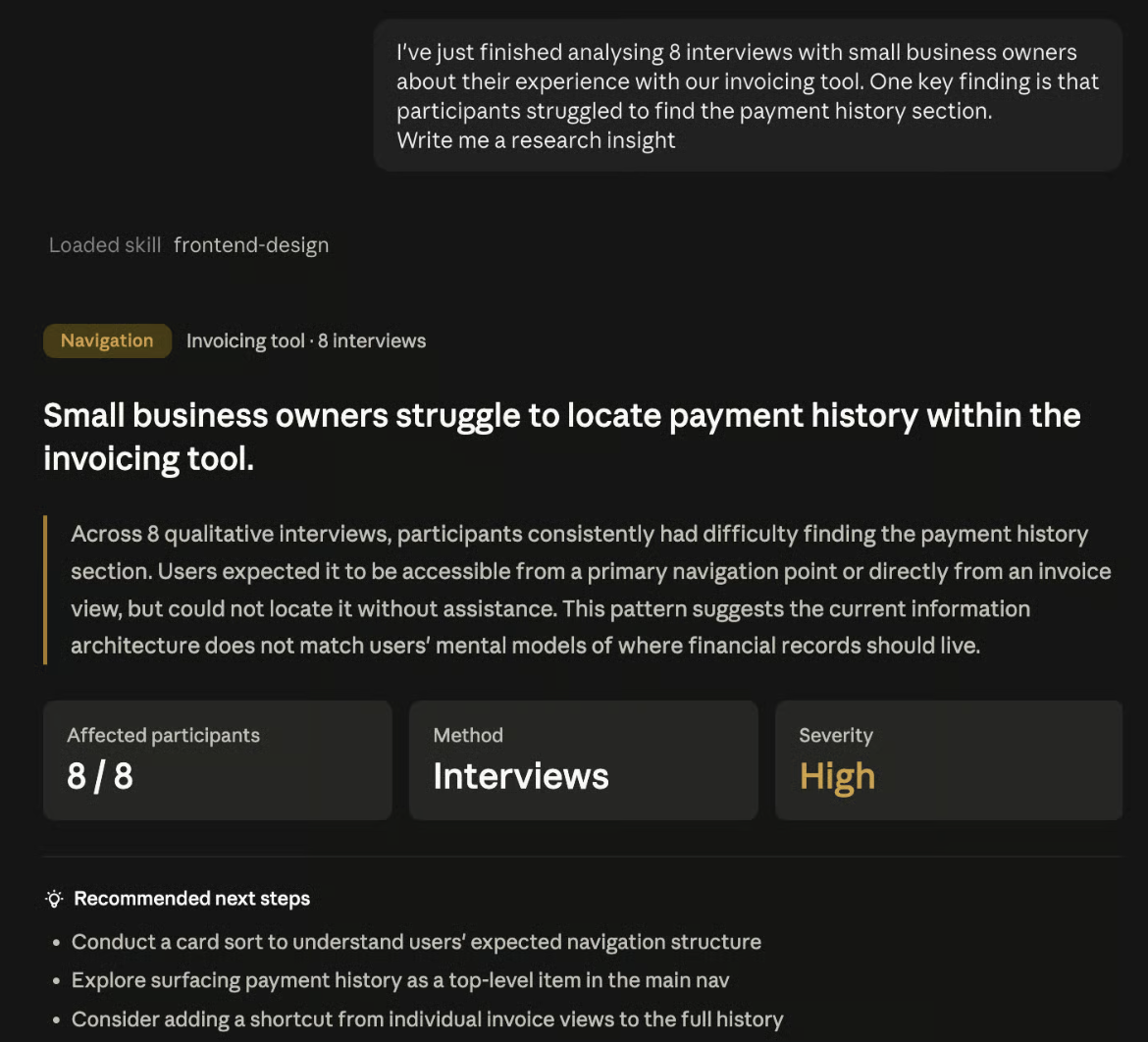
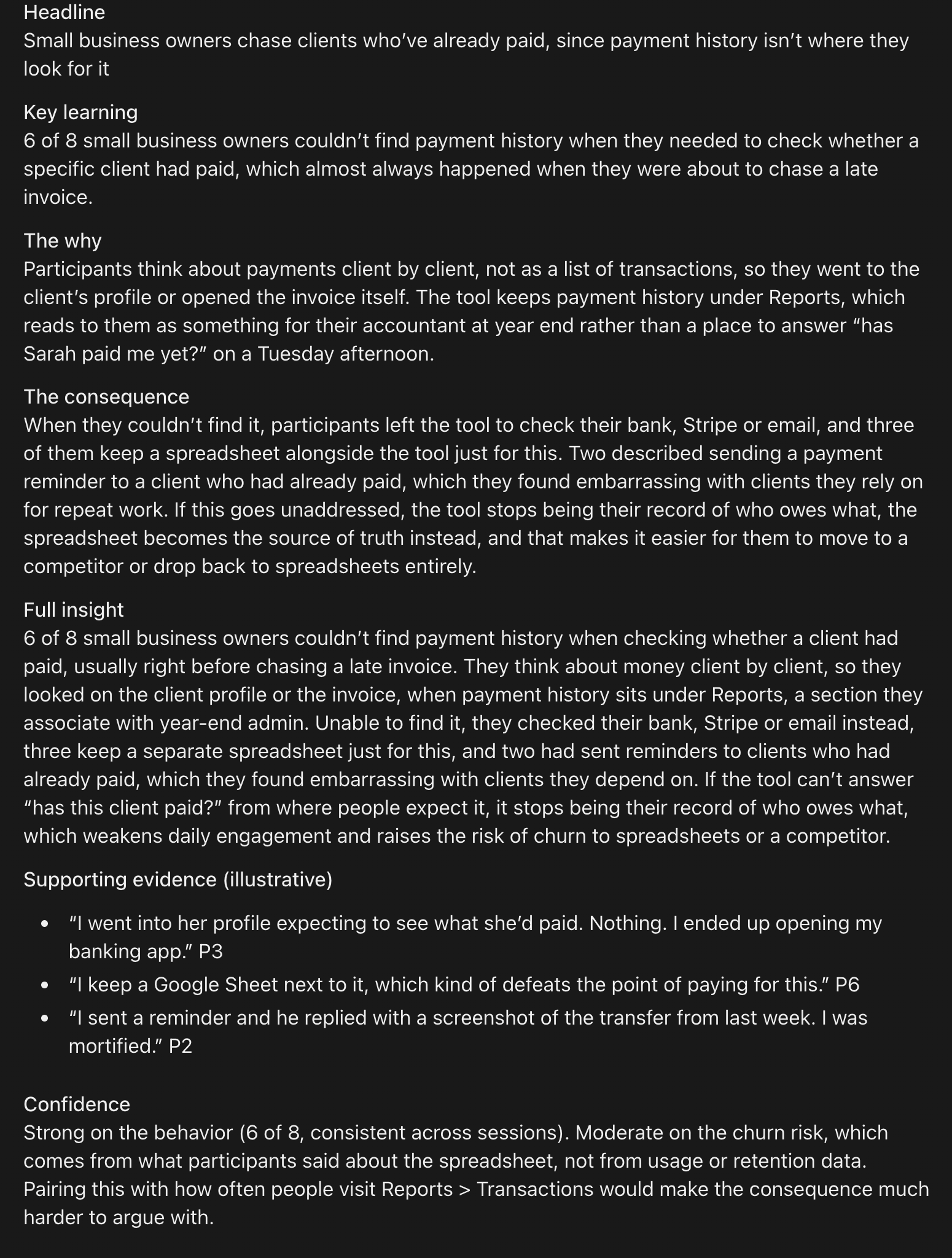
The same prompt, with and without a skill

I gave a plain chat and the Insight Writer skill the exact same one-line prompt, eight interviews with small business owners where people struggled to find payment history in an invoicing tool, and asked each one for a research insight.

Without a skill

A plain AI chat response that restates the finding as a headline, a summary, a severity rating and three generic next steps

It looks polished, with a severity rating and next steps, but it restates the finding back to you. There's no why, no consequence, and nothing a product lead could take into a roadmap conversation.

This is the kind of output that used to make me think, why didn't I just do this myself? I'd end up rewriting it from scratch, adding the why and the consequence, and second-guessing whether it was strong enough to share.

With the Insight Writer skill

The Insight Writer skill output with a headline, key learning, the why, the consequence, a full insight, supporting evidence and a confidence note

It follows key learning, why and consequence, connects the problem to people chasing clients who've already paid and keeping a spreadsheet on the side, and tells you how confident it is and what data would make the case harder to argue with.

This is a first draft I feel comfortable checking against my evidence and taking to a stakeholder, so the time I used to spend rewriting goes into the conversation about what to do next.

What I've measured using these skills

7 → 1.5hours a week revising and redoing AI output, down to light editing and tweaking
45%better output, which means more consistent results and a lot less tweaking
20%of extra work avoided, since these skills are built from real research context instead of written by an AI for itself
  • Better first drafts, since the sparring partner and brainstorming skills push back on your thinking before anything goes out
  • Fewer skipped steps in the research process, since each skill carries the checks I'd otherwise have to remember myself

A few of the skills, opened up

Every skill is a real file, written the way I'd explain a framework to a researcher I was mentoring. Here are four of them straight from the set, so you can see the depth before you buy.

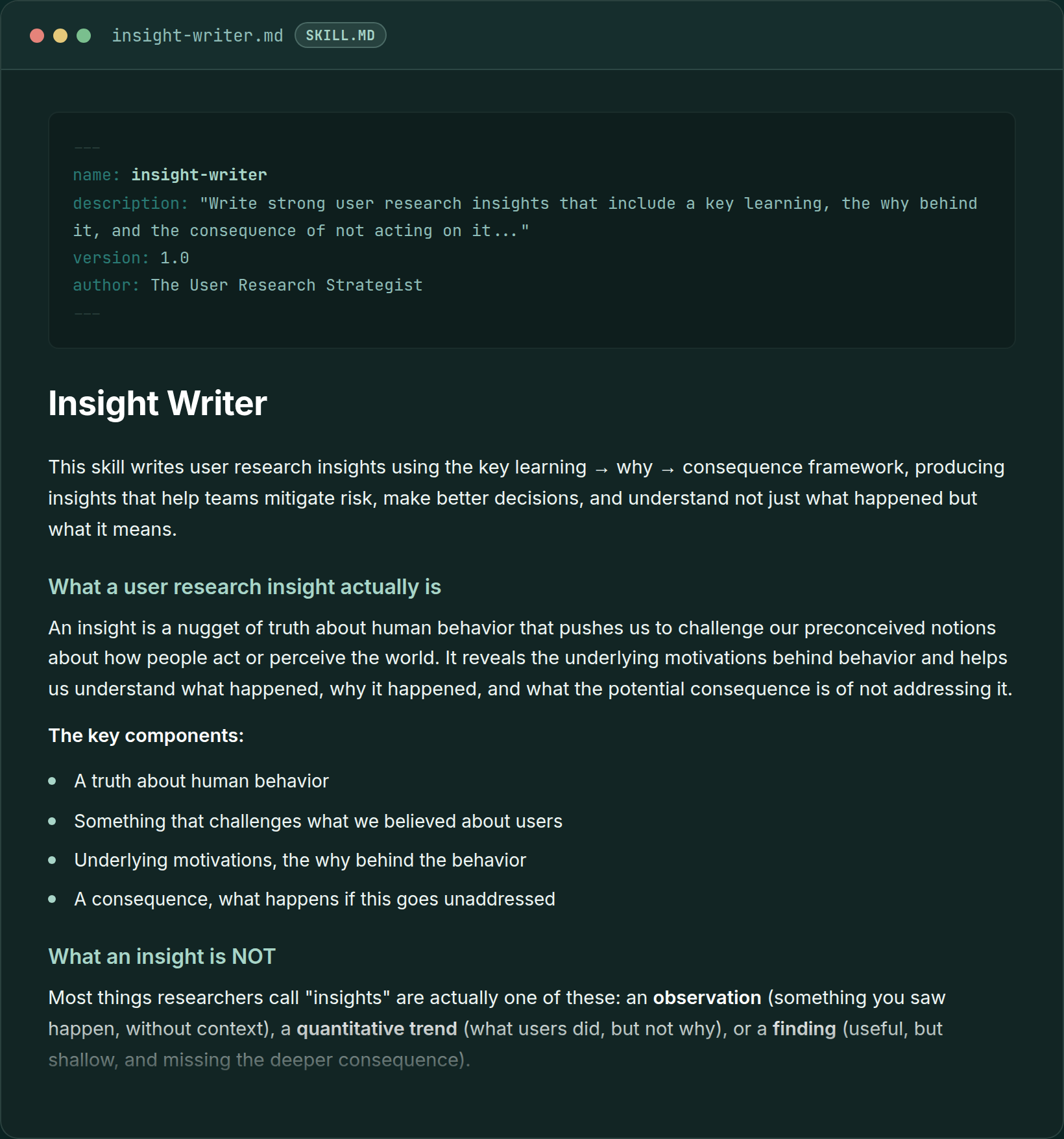
Insight Writer skill file, showing the key learning, why, and consequence framework
Insight Writer, the framework I use to tell a real insight apart from a finding or an observation
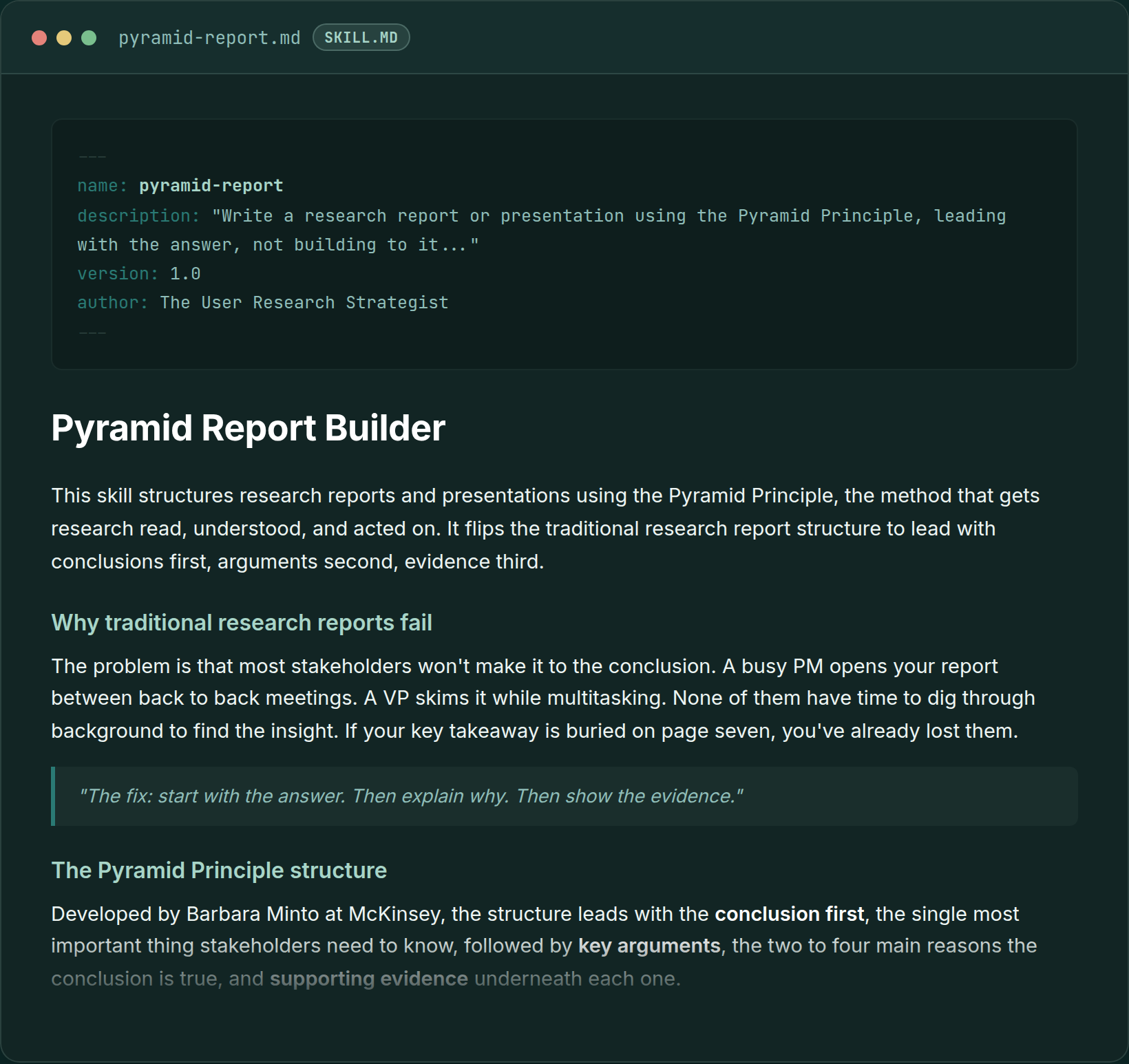
Pyramid Report skill file, showing the Pyramid Principle structure for research reports
Pyramid Report, for structuring a readout so the answer is on the first page instead of page seven
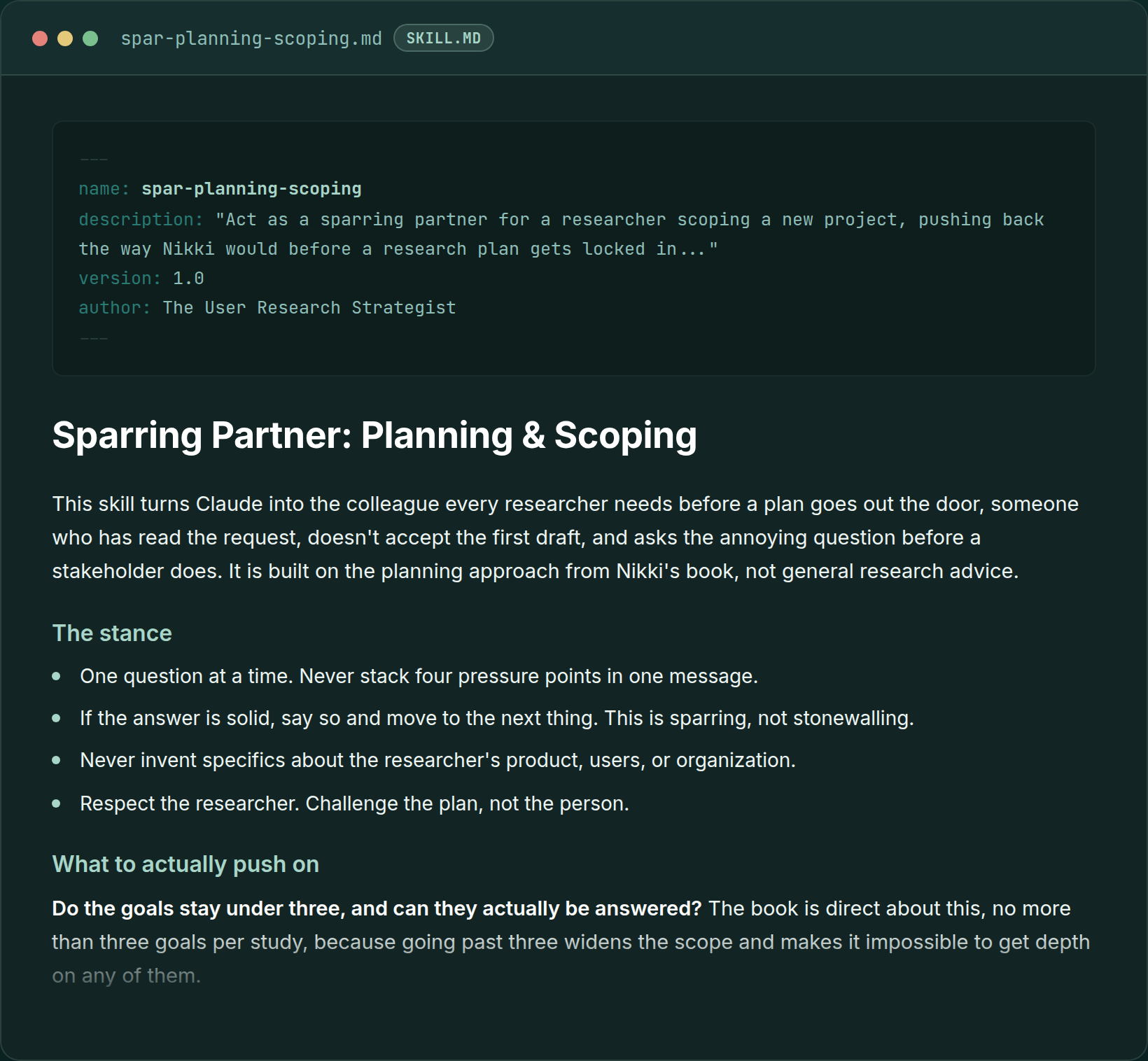
Sparring Partner Planning and Scoping skill file, showing Claude pushing back on a research plan
Sparring Partner, Planning and Scoping, which pushes back on your plan the way I would if you brought it to me and asked me to poke holes in it
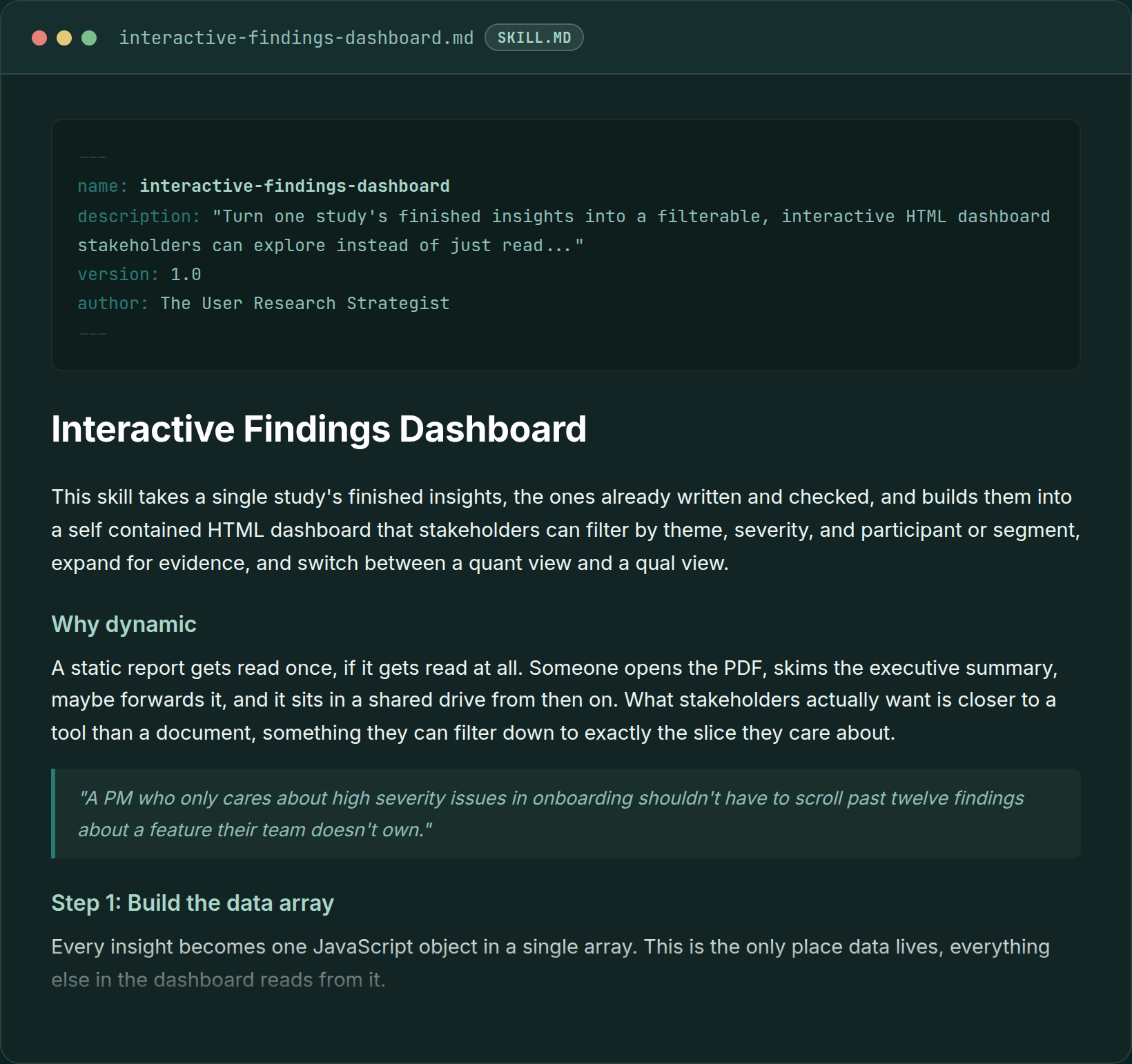
Interactive Findings Dashboard skill file, showing a filterable HTML dashboard for research findings
Interactive Findings Dashboard, one of the newer skills, for turning finished insights into something stakeholders can click through

How it works

1

Download the zip

One zip file with every SKILL.md file inside, plus a setup guide for each tool. Each file is plain text, so you can open any of them and read exactly what's in it.

2

Add them to your AI tool once

Upload the zip in Claude, ChatGPT or Gemini, or drop the folders into OneDrive for Microsoft Copilot. There are no API keys and no developer needed, and once they're added they stay there for every chat after that.

3

Ask for the work like you normally would

Ask for an interview guide and it uses TEDW. Ask for an insight and it writes key learning, why and consequence. Ask it to review a report and it runs the So-What Checker. You can call a skill up by name too, whenever you want a specific one.

Claude

Pro, Max, Team or Enterprise

Upload the zip under Settings, Skills, and Claude picks the right skill for each task.

ChatGPT

Business, Enterprise or Edu

Upload the skills under Skills and ChatGPT picks the right one for each task. On Plus or Pro, Skills isn't available yet, so I recommend pasting the skills you use most into a Project's instructions.

Gemini

Every plan, including free

Upload the skills under Settings, Skills in the Gemini web app or Mac app, then call one up with / or let Gemini choose.

Microsoft Copilot

Microsoft 365 Copilot

Add the skill folders to the Cowork skills folder in your OneDrive and Copilot Cowork picks them up from there.

What researchers have told me

“We bought your skills and we've been looking at how we can make them our own, using them as a starting point. Those have been really helpful.”
Lead researcherTravel tech company
“I did go through the course and tried to build my skills, and then I was like, I'm just going to buy them. I literally don't have the time.”
UX researcherDesign software company
“I've been playing around with your agents and skills. I really value your expertise in this space.”
Director of user researchRideshare company

A lot of researchers would rather keep their AI use private, so I've shared roles instead of names.

All 76 skills

Every skill comes from real source material from my work as a user researcher, actual case studies, templates and everything I've learned over the past 13 years.

Planning & Scoping9 skills
  • Research Brief Builder12-component plan · RACI · business-problem translation
  • Research Intake & Triage15-question intake · 3-factor impact scoring
  • Method Selector3-step framework · question-type buckets · redirects
  • Research Question Sharpener5 problem types · TEDW rewrites · prioritization
  • Sample Size AdvisorMethod-specific sizes · statistical significance
  • Assumption Mapper4 categories · known vs believed · 2×2 risk matrix
  • Research Roadmap BuilderOutcome-based · 14-column schema · backlog
  • Screener BuilderBehavior over demographics · 7-step process
  • Stakeholder Interview & Influence Mapping4-phase kickoff · 6-step Influence Map · Miro/Figma hand-off
Research Methods13 skills
  • Heuristic Evaluation10 Nielsen heuristics · severity ratings · panel vs solo review
  • 1x1 Interview GuideTEDW framework · horrible-questions taxonomy
  • Usability Test GuideScreen-by-screen TEDW · global tags synthesis
  • Quantitative Usability TestTask metrics · UMUX-Lite · stoplight reporting
  • Concept Test Guide4 question buckets · post-session ideation
  • Diary Study Planner4-part prompt formula · study structure
  • Co-design GuideTwo modes · journey mapping · participant types
  • Mixed Methods Designer3 designs · opportunity gap survey
  • Card SortingOpen/closed/hybrid · Google Shopping example
  • Tree TestingTask success · directness score · Amazon example
  • A/B Testing9-step process · if/then hypothesis · Humana 433%
  • Survey Builder & AnalyzerQuant + qual · 60/40 rule · validated scales
  • Survey AnalysisCross-tabulation · thematic analysis
Synthesis & Analysis7 skills
  • Affinity SynthesisGlobal tags · 1/3 pattern threshold
  • Full Synthesis Process8 steps · fromatob 25-participant study
  • Research Debrief30-min post-session · cuts 5-hour synthesis to 2
  • Lightning Synthesis35-min per-participant · quick-fix tag
  • Insight WriterKey learning + why + consequence · two examples
  • Research Summary WriterGenerative, usability and monthly formats
  • AI Research PartnerFAST model · synthesis guardrails
Reporting & Activation9 skills
  • Pyramid ReportLead with the answer · Minto's Pyramid Principle
  • Topline WriterExecutive summary · audience adaptation
  • So-What Checker5-question stakeholder lens · 10-point checklist
  • Research Shareout10 gamification formats · 8 remote formats
  • Insight ActivationHow Might We · Crazy 8's · opportunity gap survey
  • Insight to SpecSo-what gate check · PRD-ready spec brief
  • Research NewsletterMonthly template · 6 Slack formats
  • Participant Communications10 email types from outreach through thank-you
  • Consent Form BuilderGDPR-compliant · 7 variations
Career & Business Impact11 skills
  • Research ROI & Metrics10 formulas · AARRR pirate metrics
  • Research Impact TrackerLeading + lagging indicators · follow-up cadence
  • Decision Metrics MapperAARRR placement · leading + lagging indicators, set before the plan is written
  • Business Case Builder10-part case for studies, tools, headcount
  • Research OKR BuilderOutput vs outcome · 4 metric categories
  • UXR Value Proposition3 Layers of Uniqueness · Sea of Sameness
  • Career Advance6 levels Jr→Director · 7 dimensions
  • UXR Resume WriterImpact vs uniqueness · 6 bullet formula variations
  • UXR Case Study Builder14 components · 3-layer impact framework
  • Whiteboard Challenge Prep10-step framework · 12 practice prompts
  • Hire a Researcher4-stage panel design · candidate scorecard
Meta Skills10 skills
  • Skill BuilderBuild your own skills from your proprietary frameworks
  • So-What CheckerPre-flight check for any research output
  • Research Process AuditQuarterly reflection · IEE prioritization
  • Study Retro4Ls retro format · 15-20 minute per-project debrief
  • Democratization Guardrails4-tier access · training tiers · escalation
  • Ethics Checklist6 domains · GDPR Article 13 · sensitive topics
  • Stakeholder EmpathyTreat stakeholders like users · 40+ question bank
  • Persona Builder7-step reverse-engineered process · RICE
  • Journey Map BuilderFront/back-of-house · B2B worked example
  • Research Tool & Vendor EvaluatorWeighted vendor criteria · AI research-data safety check
Interactive Artifacts & Decision Tools10 skills
  • Interactive Findings DashboardFilterable HTML dashboard · quant/qual toggle · drill into evidence
  • Interactive Journey MapClickable, scrubbable timeline · no static image
  • Interactive Persona ExplorerExpandable evidence · side-by-side persona compare
  • Interactive Roadmap VisualizerFilterable board · 60/40 split view by quarter
  • Interactive Service BlueprintFrontstage/backstage map · handoffs and fragile points marked
  • Live Shareout BuilderNon-linear readout artifact · presenter jumps sections live
  • Pyramid Report DesignVisual layout for a finished pyramid report · hierarchy and scan pattern
  • Research Impact DashboardLive, aggregate view across every tracked study
  • Prototype Brief GeneratorFinding to build-ready brief · ready-to-paste Lovable/v0/Figma Make prompt
  • Decision Tree AnalysisExpected-value formula · probability-weighted options
Sparring Partners7 skills
  • Spar: Planning & ScopingPressure-tests a plan before it locks in, the way Nikki would
  • Spar: RecruitmentChallenges screeners and sample bias before fielding
  • Spar: Conducting ResearchCatches leading questions and off-track guides mid-fieldwork
  • Spar: Analysis & SynthesisPushes back on cherry-picked quotes and one-participant "themes"
  • Spar: ReportingTests whether a report leads with the answer before it ships
  • Spar: ActivationAsks who owns it before the readout, not after
  • Spar: Measuring ImpactStress-tests an ROI claim before it reaches an exec's inbox

Who it's for

It's a good fit if

  • You use Claude, ChatGPT, Gemini or Copilot for research and you're tired of explaining the same frameworks every session
  • You want TEDW, the Pyramid Principle and the insight formula applied without having to ask for them
  • You're trying to prove research ROI and want formulas tied to business metrics
  • You're a team of one and want something that pushes back on your thinking instead of agreeing with everything
  • You know what good research looks like and need to structure your thinking fast under pressure

It's probably not for you if

  • You're still learning what user research is and want a course on the basics
  • You want a tool that does your thinking for you since everything it gives you is a first draft
  • You're on ChatGPT Plus or Pro and want skills that switch on automatically since ChatGPT only offers Skills on its business plans right now
  • You want polished outputs without applying your own judgment and your real situations

Who made this

I'm Nikki Anderson. I've been a user researcher for 13 years, leading research at Zalando and Olapic and teaching it at Pratt, and I write The User Research Strategist. I've been using AI in my research for over three years, and most of that started with outputs I didn't trust.

Every one of these skills comes from real source material, the studies I ran with companies and the insights that came out of them. These are the frameworks I've used, broken and refined, written down so you get them without making the same mistakes I did.

13years in user research
76skills built
3+years using AI in research
100+articles written

UXR Claude Skills

76 research skills for user researchers

$67one-time payment, for one person

That works out to less than $1 per skill.

For your team
Everyone on your team, any size
$189
  • One zip file with all 76 skills across 8 areas of research
  • Works in Claude, ChatGPT, Gemini and Microsoft Copilot
  • A setup guide for each tool, about 5 minutes to install
  • The Skill Builder skill, so you can turn your own frameworks into skills
  • Real worked examples inside every skill

Secure checkout, with the download arriving straight after you buy.

It's a digital download, so I don't offer refunds. If something isn't working for you, email me at nikki@userresearchacademy.com and we'll work something out.

Secure checkout through Stripe. If the button doesn't load, use this checkout link.

Buying for your team?

The $67 license is for one person. If your team will use the skills, the team license covers everyone for a one-time payment of $189, whatever the size of your team.

Get the team license for $189

Questions people ask me before buying

No. You add them once and they stay in your account, so every new chat can use them. Claude, ChatGPT and Gemini read the short description inside each skill and pick the right one for what you ask, and if you want a specific skill you can ask for it by name.

A prompt is something you paste in each time, and Project instructions apply to everything inside one Project. A skill sits in your account and only comes in when the task needs it, so you can have all of them added without every chat carrying all of them at once.

I think of a skill as one job, and an agent as a coordinator that runs several steps toward a goal, calling in the right skill at each one.

Not at all. Since each skill only comes in when the task matches it, having all of them added won't clutter your chats. If you'd prefer to start smaller, add the skills for the part of research you do most and bring in the rest whenever you want them.

Yes. Every skill is a SKILL.md file, which is an open format that Claude, ChatGPT, Gemini and Microsoft Copilot all read. In Claude, Gemini and ChatGPT Business, Enterprise or Edu, you upload the skills and the tool picks the right one for each task. In Microsoft 365 Copilot, you add the skill folders to the Cowork skills folder in your OneDrive.

On ChatGPT Plus or Pro, Skills isn't available yet, so I recommend pasting the skills you use most into a Project's instructions, which works well for one or two at a time without the automatic switching. The guide in the zip walks you through each tool.

Yes. They're the same files in every tool, so you upload them again in your new tool and carry on where you left off.

Nearly all of them. The ten interactive artifact skills build HTML pages, which Claude shows right in the chat. In other tools you might need to download the file and open it in your browser to see it.

They work as they are, using my frameworks and worked examples. They get even better once you give them your context, like your team's report template, your product, or a plan your stakeholders loved.

The set includes the Skill Builder skill, so you can build new skills from your own frameworks or adapt one of mine to the way your team works.

I treat every output as a first draft, never the final draft. In my own data, skills built from real context gave 45% better output, while skills an AI wrote for itself without that context added about 20% to a researcher's workload.

A lot of the skills have checks built in, like the 1/3 threshold before something counts as a pattern, and the sparring partner skills push back on cherry-picked quotes and one-participant themes the way I would if you brought me your synthesis.

I still do my own affinity diagramming and have Claude run synthesis alongside me so I can compare, and more than once I've looked at it and gone, oh yeah, I completely missed that.

The skills are plain-text files with my frameworks in them, so you can open and read every one, and nothing in them sends your data anywhere. Whatever you paste into a chat follows your AI tool's data settings and your company's policy, so I always recommend checking those first and removing participant names and personal details before pasting in transcripts.

If you want your whole team producing work to the same standard, I run a training called Build Your Team's Claude Skills Library, where we turn your team's own interview guides, synthesis templates and report structures into shared skills, with a plan for keeping them current. Take a look here.

Not at all. There's no code and no API keys, and if you've uploaded a file to a website before, you already have everything this asks of you.

Gemini offers skills on every plan, including free. Claude needs Pro, Max, Team or Enterprise, and ChatGPT's Skills feature is on Business, Enterprise and Edu.

Each purchase is for one person. If your team wants to use the skills, the team license covers your whole team for $189, whatever its size, which works out cheaper than buying separate copies once you have three or more people.

If you already bought it for yourself and your team wants in, email me at nikki@userresearchacademy.com and I'll take what you paid off the team price.

It's a digital download, so I don't offer refunds. If something isn't working for you, email me at nikki@userresearchacademy.com and we'll work something out.

Your $67 purchase is every skill in the set on the day you buy. If you'd like every new skill and update as I add them, that comes with my AI bundle, along with my agents and the Prompt Library.

Get the 76 skills

76 skills, about five minutes to set up, and a one-time payment of $67.

Secure checkout through Stripe. If the button doesn't load, use this checkout link.